
This guide explains the plan detail page, how renewal works, and how to cancel or undo a cancellation.
1. Open the plan details
- Open VPN > Access Profiles.
- Click the three dots ⋮ on the plan, then View details.
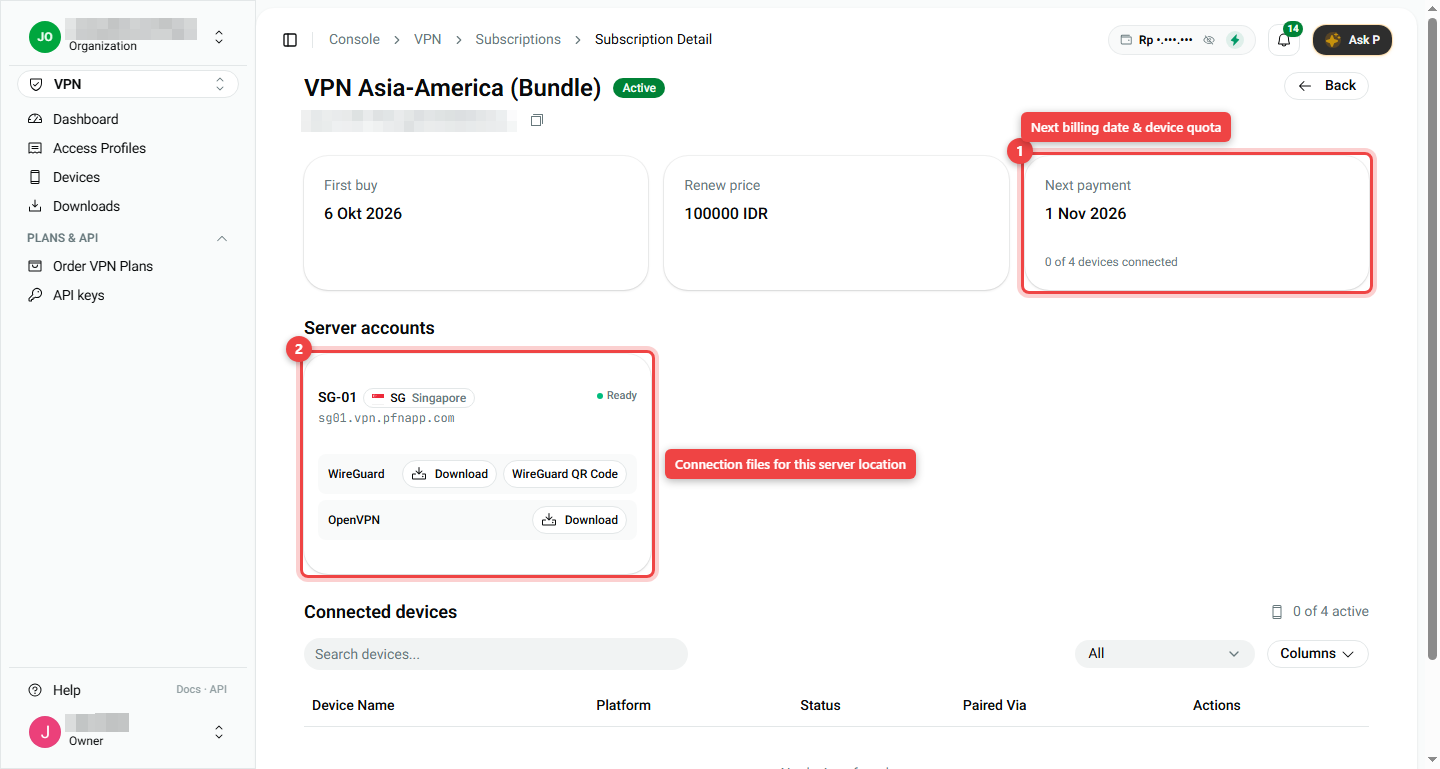
The detail page shows:
- First buy: the day you bought the plan.
- Renew price: what you pay each month.
- Next payment (number 1): the next day your balance is charged, plus how many devices are connected out of the limit.
- Server accounts (number 2): each server location, with Download buttons for the connection files and a WireGuard QR Code.
- Connected devices: the list of devices on this plan.
2. How renewal and billing work
- Plans renew automatically on the 1st of each month.
- The money comes from your organization balance. Keep it topped up.
- In your first month you pay only for the days left in that month.
- See all charges in Billing > Transactions and Billing > Invoices.
Plan status words
| Status | Meaning |
|---|---|
| ACTIVE | Working normally |
| Cancelling | You cancelled. It still works until the end date |
| Suspended | Paused, usually because the balance was too low |
| Expired | Ended. Order a new plan to use VPN again |
3. Cancel a plan
- Open VPN > Access Profiles.
- Click the three dots ⋮ on the plan, then Cancel.
- Read the end date. Your VPN keeps working until that day.
- Write why you are cancelling (this helps us improve).
- Type the word CANCEL in the box to confirm.
- Click Yes, cancel subscription.
Changed your mind? Click Keep subscription to close without cancelling.
4. Undo a cancellation
As long as the end date has not passed, you can keep the plan:
- Open VPN > Access Profiles.
- Click the three dots ⋮ on the plan, then Reinstate.
- Write a short reason and confirm.
Normal monthly billing continues after that.
Summary
| I want to... | Do this |
|---|---|
| See dates and price | ⋮ > View details |
| Know when I pay next | Detail page > Next payment |
| Stop the plan | ⋮ > Cancel > type CANCEL > Yes, cancel subscription |
| Undo the cancel | ⋮ > Reinstate |
- Renewal is on the 1st of every month from your balance.
- Cancelling is safe: the VPN works until the paid period ends.