
For developers. This guide needs some programming. If you only use the console, start at App Hosting: Put Your First App Online.
This guide takes you from nothing to a running app using only HTTP requests. Every example uses https://pfnapp.id. The full endpoint list is in the API Reference.
Warning: step 4 charges your organization balance with real money. Check prices and balance first (steps 2 and 3).
flowchart LR
  A[1. Create API key] --> B[2. Check balance]
  B --> C[3. Pick plan and template]
  C --> D[4. Send the order]
  D --> E[5. Watch the status]
  E --> F[6. Cancel if needed]
1. Create an API key
- Open Console > API Keys (
/console/api-keys) and click Create API key. - Enter a Name (for example
order-app-hosting), choose the App Hosting or All products product, and Write access. - Click Create key and copy the key that appears. It is shown only once.
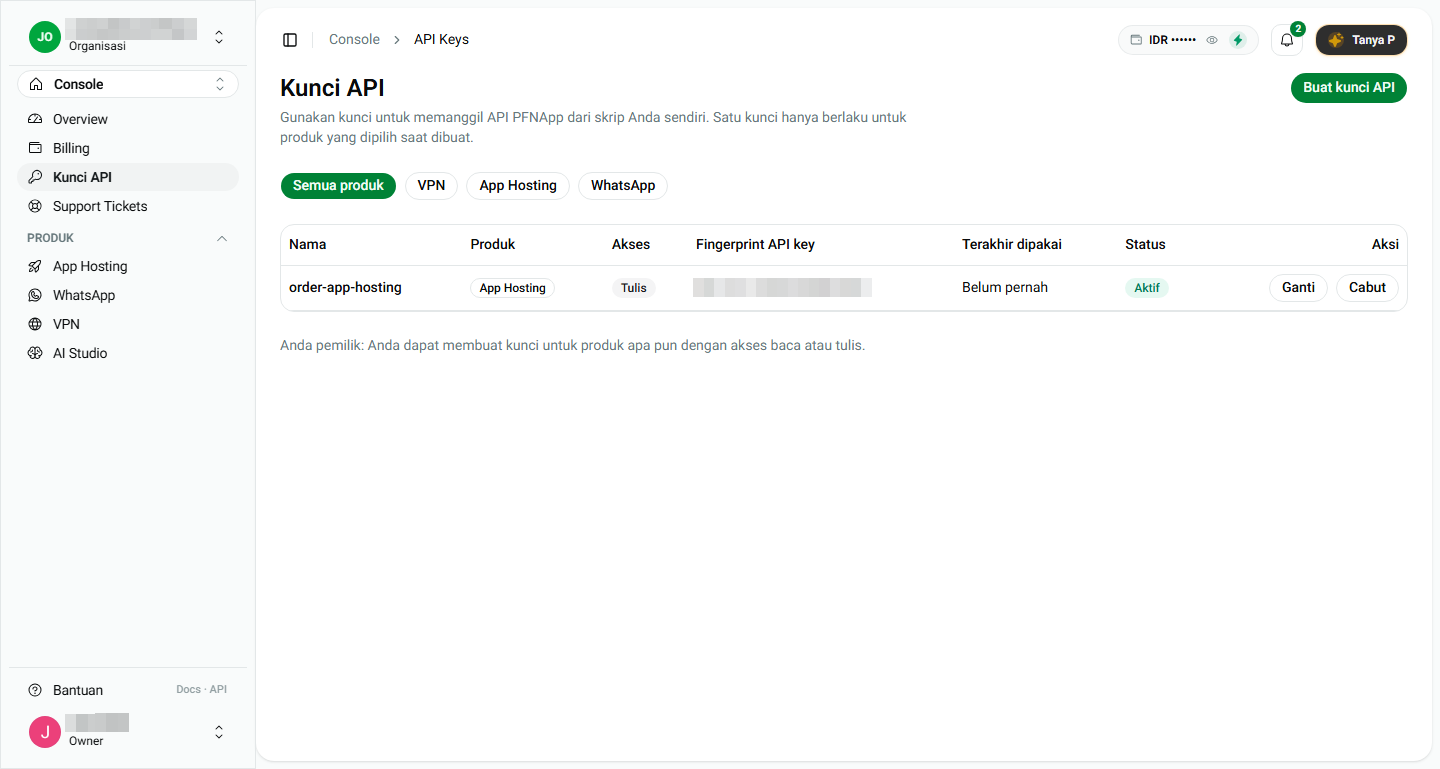
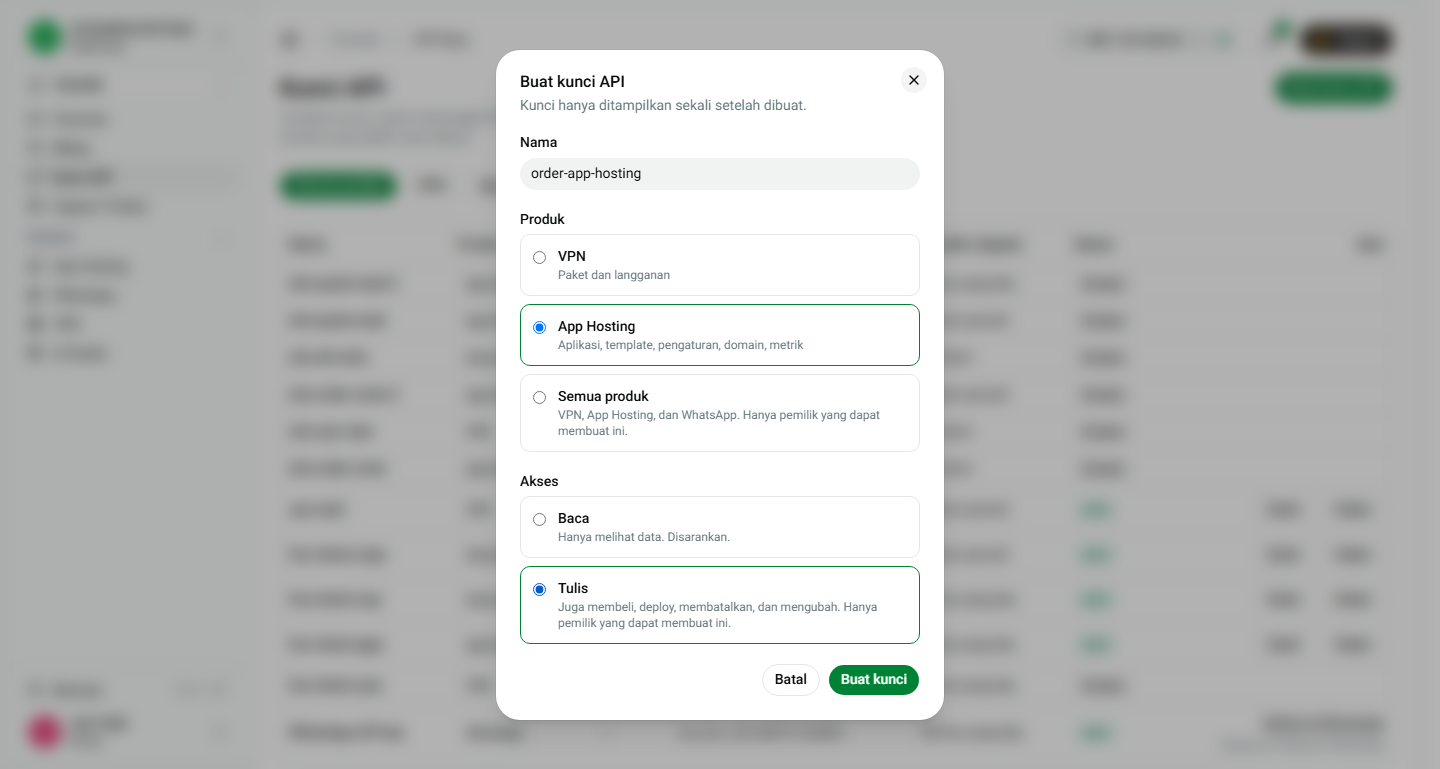
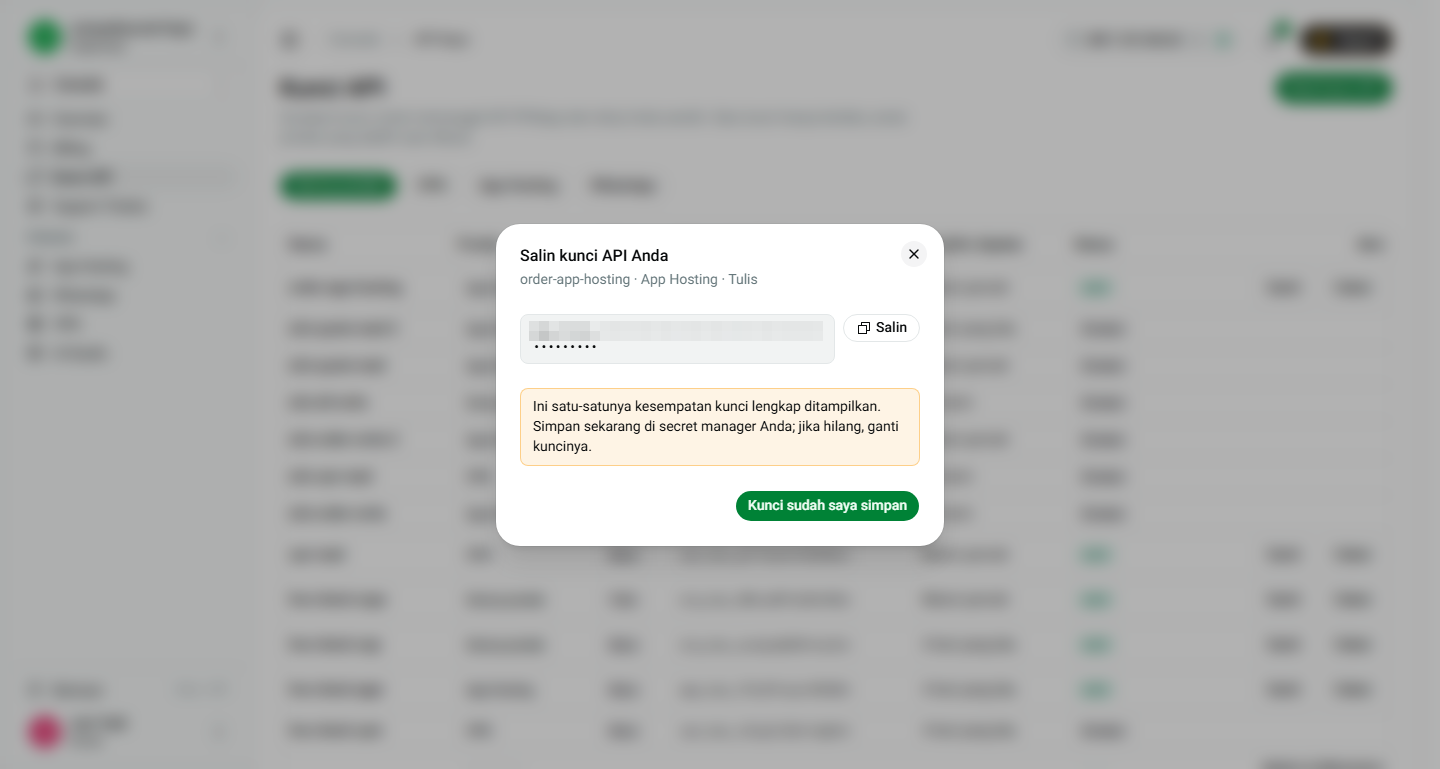
Key rules:
- Write access is required to order and cancel. Read access only views data, and ordering with a Read key returns
403 API_KEY_ACCESS_NOT_ALLOWED. - Only the organization Owner can create a Write key.
- A key of another product (for example WhatsApp) is rejected with
403 API_KEY_PRODUCT_NOT_ALLOWED.
Keep the key in an environment variable, never in code or a repository:
export PFN_API_KEY="app_live_..."
Every request below sends the header Authorization: Bearer $PFN_API_KEY.
2. Check the balance
curl -s https://pfnapp.id/api/billing/account \
  -H "Authorization: Bearer $PFN_API_KEY"
Response:
{ "ok": true, "currency": "IDR", "balance": "7107659.35" }
When the balance is too low at order time, the API answers 402 INSUFFICIENT_BALANCE with a topupUrl and creates nothing.
3. Pick a plan, a region, and a template
Prices and plans
curl -s https://pfnapp.id/api/billing/catalog \
  -H "Authorization: Bearer $PFN_API_KEY"
Find the product with code APP_HOSTING. Take two values from it:
plans[].id, forresourcePlanId. Also checkplans[].resources.provisioning.storage(GB), because some templates need a minimum amount of storage.plans[].offers[].regionId, forregionId. Each offer also carriesbillingPeriodandperiodPrice.
Shape of the response (trimmed):
Templates
curl -s https://pfnapp.id/api/templates \
  -H "Authorization: Bearer $PFN_API_KEY"
This endpoint returns a bare array (no ok). Use the template slug as templateId, for example 9router.
A plan that is too small for the template returns
422 INSUFFICIENT_PLAN_STORAGEand costs nothing. The9routertemplate needs 10 GB, so a 5 GB plan (Small, Starter) is rejected and Pro or larger is accepted.
4. Send the order
Endpoint: POST /api/deploy/submit. The Idempotency-Key header is required for API keys. Create one unique value per order, for example a UUID.
cURL
Node.js / TypeScript
Body fields
| Field | Description |
|---|---|
sourceType | TEMPLATE, MANAGED_TEMPLATE, or PUBLIC. GITHUB is rejected with 422 SOURCE_TYPE_NOT_ALLOWED_FOR_KEY. |
templateId | The slug from GET /api/templates. |
name | App name. |
resourcePlanId | plans[].id from the catalog. |
billingPeriod, periodMonths | For example MONTHLY and 1. |
regionId | offers[].regionId from the catalog. |
The server resolves the billing mode from the catalog, so a billingMode you send is ignored.
Success response
The balance is charged and the first deployment starts right away.
5. Idempotency: safe to retry
| Situation | Result |
|---|---|
Same request, same Idempotency-Key | The first answer is returned with the header Idempotent-Replayed: true. It never orders twice. |
Same Idempotency-Key, different body | 422 IDEMPOTENCY_KEY_REUSED |
| First request still running | 409 IDEMPOTENCY_IN_PROGRESS |
| The order failed | The key is freed, so you may retry with the same key |
A key is kept for 24 hours. If the connection drops after you sent the order, resend the exact same request with the same Idempotency-Key. Do not create a new key, because that would order again.
6. Watch the status
curl -s https://pfnapp.id/api/deploy/apps/my-app \
  -H "Authorization: Bearer $PFN_API_KEY"
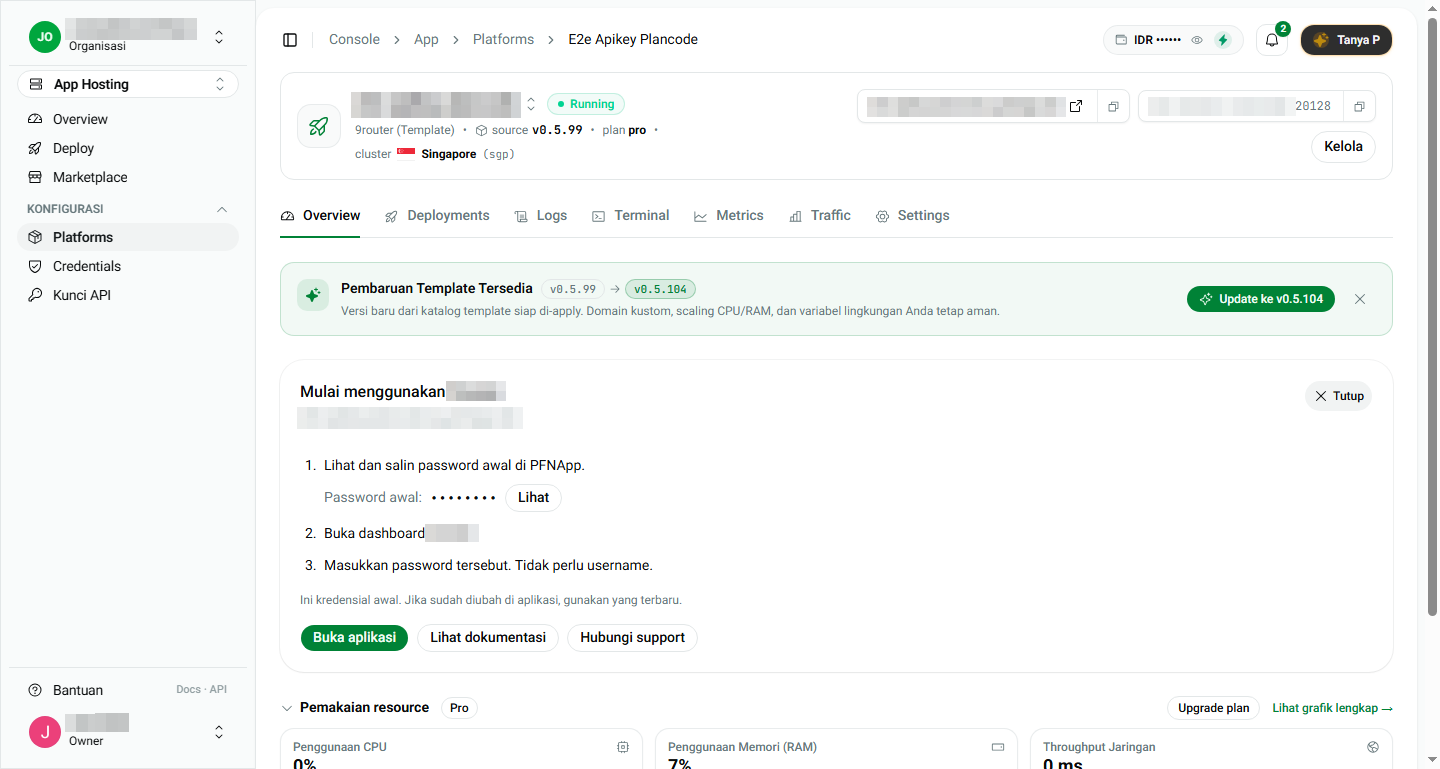
The response has data.stack (app status, resourcePlanId, subdomain) and data.latestDeployment (latest deployment status). Repeat until status is running.
The same app also shows in the console:
7. Cancel
curl -X POST "https://pfnapp.id/api/deploy/apps/my-app/cancel" \
  -H "Authorization: Bearer $PFN_API_KEY" \
  -H "Content-Type: application/json"
No body is needed. The cancel is scheduled for the end of the current period. The app stays active until that date, then all its resources are deleted permanently, and there is no refund. Export important data before that date.
8. First-period cost
The first period is prorated to the end of the month. Example from a test: a Pro plan with a monthly price of Rp75,000 ordered on the 16th (16 of 31 days) was charged Rp38,709.68. After that, billing follows the period you chose.
9. Error list
| Status | Code | Meaning |
|---|---|---|
| 400 | IDEMPOTENCY_KEY_REQUIRED, IDEMPOTENCY_KEY_INVALID, or PARSE_ERROR | The Idempotency-Key header is missing or malformed, or the JSON is broken. |
| 401 | UNAUTHORIZED | The key is missing, wrong, or revoked. |
| 402 | INSUFFICIENT_BALANCE | Balance too low. Open the topupUrl from the response. |
| 403 | API_KEY_PRODUCT_NOT_ALLOWED | The key belongs to another product (for example VPN-only or WhatsApp), not App Hosting. |
| 403 | API_KEY_ACCESS_NOT_ALLOWED | A Read key was used to order or cancel. |
| 409 | IDEMPOTENCY_IN_PROGRESS | A request with the same key is still being processed. |
| 422 | IDEMPOTENCY_KEY_REUSED | The same key was used with a different body. |
| 422 | SOURCE_TYPE_NOT_ALLOWED_FOR_KEY | GITHUB is not allowed through an API key. |
| 422 | INSUFFICIENT_PLAN_STORAGE | The plan is too small for the template. |
| 429 | RATE_LIMITED | At most 60 requests per minute per key. |
10. Safe practices
- Keep the key in a secret manager or an environment variable, not in code.
- Use a Read key for dashboards and monitoring, and a Write key only for the process that orders.
- Create a new
Idempotency-Keyfor every order, and reuse one only when retrying the same order. - Revoke unused keys in Console > API Keys. A call with a revoked key answers
401right away.