
This workflow guide covers automated One-Time Password (OTP) dispatch to customer WhatsApp numbers for registration, login, and sensitive transaction verification.
1. Mobile Preview of the OTP Message
How the official AUTHENTICATION template appears with the Copy Code button:
CODE
1┌──────────────────────────────────────────────┐
2│ 🔐 Account Security Code │
3│ │
4│ Your PFNApp verification code is: *492019* │
5│ Valid for 5 minutes. Do not share this code │
6│ with anyone under any circumstances. │
7│ │
8│ ──────────────────────────────────────────── │
9│ [ 📋 Copy Code: 492019 ] │
10│ 14:20 ✓✓ │
11└──────────────────────────────────────────────┘
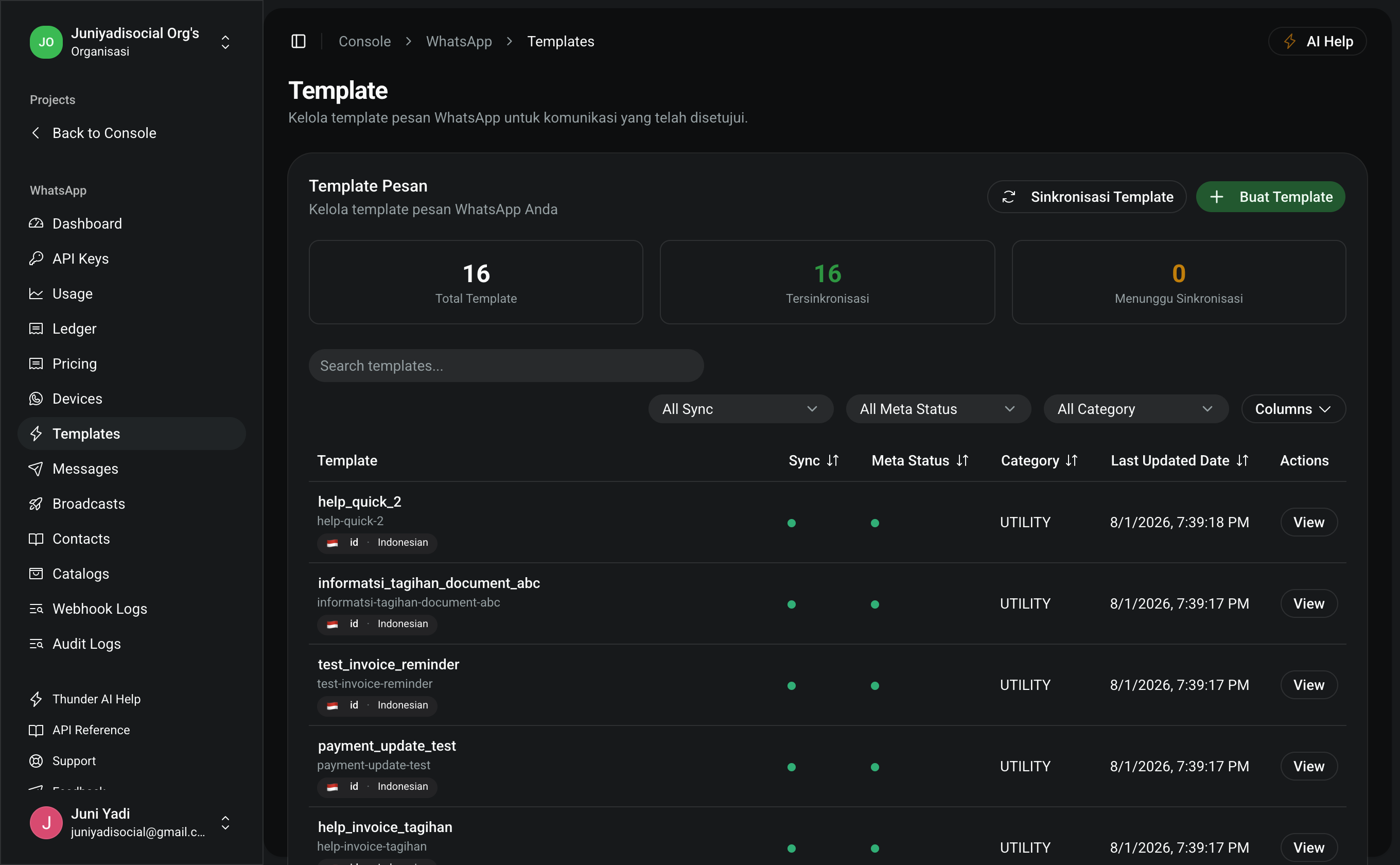
2. Template Setup (1 Minute)
- Open Console > WhatsApp > Templates (
/console/whatsapp/templates). - Click Create Template:
- Template Name:
otp_auth_code - Category:
AUTHENTICATION - Language: English (
en) or Indonesian (id) - Button Type:
OTP / COPY_CODE
- Template Name:
- Save and wait for automatic approval.
3. Implementation Code
Send an HTTP POST request to /api/whatsapp/messages using template parameters:
Node.js / TypeScript (Next.js / Express Backend)
TYPESCRIPT
1interface SendOtpOptions {
2 phoneNumber: string
3 otpCode: string
4}
5
6export async function sendWhatsAppOtp({
7 phoneNumber,
8 otpCode,
9}: SendOtpOptions) {
10 const response = await fetch("https://pfnapp.id/api/whatsapp/messages", {
11 method: "POST",
12 headers: {
13 Authorization: `Bearer ${process.env.PFN_WHATSAPP_API_KEY}`,
14 "Content-Type": "application/json",
15 },
16 body: JSON.stringify({
17 to: phoneNumber, // e.g., "+6281234567890"
18 type: "template",
19 template: {
20 name: "otp_auth_code",
21 language: { code: "en" },
22 components: [
23 {
24 type: "body",
25 parameters: [
26 { type: "text", text: otpCode }, // Variable {{1}} in body
27 ],
28 },
29 {
30 type: "button",
31 sub_type: "copy_code",
32 index: "0",
33 parameters: [
34 { type: "text", text: otpCode }, // Copy Code button parameter
35 ],
36 },
37 ],
38 },
39 }),
40 })
41
42 if (!response.ok) {
43 const errorData = await response.json()
44 throw new Error(`Failed to send OTP: ${JSON.stringify(errorData)}`)
45 }
46
47 return await response.json()
48}
PHP / Laravel (Service Class)
PHP
1namespace App\Services;
2
3use Illuminate\Support\Facades\Http;
4
5class WhatsAppOtpService
6{
7 public function sendOtp(string $phoneNumber, string $otpCode): array
8 {
9 $response = Http::withToken(config('services.pfn.whatsapp_key'))
10 ->post('https://pfnapp.id/api/whatsapp/messages', [
11 'to' => $phoneNumber,
12 'type' => 'template',
13 'template' => [
14 'name' => 'otp_auth_code',
15 'language' => ['code' => 'en'],
16 'components' => [
17 [
18 'type' => 'body',
19 'parameters' => [
20 ['type' => 'text', 'text' => $otpCode],
21 ],
22 ],
23 [
24 'type' => 'button',
25 'sub_type' => 'copy_code',
26 'index' => '0',
27 'parameters' => [
28 ['type' => 'text', 'text' => $otpCode],
29 ],
30 ],
31 ],
32 ],
33 ]);
34
35 return $response->throw()->json();
36 }
37}
Python (FastAPI / Django Backend)
PYTHON
1import os
2import requests
3
4def send_whatsapp_otp(phone_number: str, otp_code: str) -> dict:
5 url = "https://pfnapp.id/api/whatsapp/messages"
6 headers = {
7 "Authorization": f"Bearer {os.getenv('PFN_WHATSAPP_API_KEY')}",
8 "Content-Type": "application/json",
9 }
10 payload = {
11 "to": phone_number,
12 "type": "template",
13 "template": {
14 "name": "otp_auth_code",
15 "language": {"code": "en"},
16 "components": [
17 {
18 "type": "body",
19 "parameters": [{"type": "text", "text": otp_code}],
20 },
21 {
22 "type": "button",
23 "sub_type": "copy_code",
24 "index": "0",
25 "parameters": [{"type": "text", "text": otp_code}],
26 },
27 ],
28 },
29 }
30
31 res = requests.post(url, json=payload, headers=headers)
32 res.raise_for_status()
33 return res.json()
4. Security Recommendations & Best Practices
- Token Expiry (TTL): Store OTP hash inside Redis cache with a strict TTL of 3 to 5 minutes.
- Rate Limiting: Limit OTP requests to 3 attempts per phone number per 10-minute window to avoid abuse.
- E.164 Phone Normalization: Sanitize user input to international format (e.g.,
0812...to+62812...) before dispatch.